

Overview
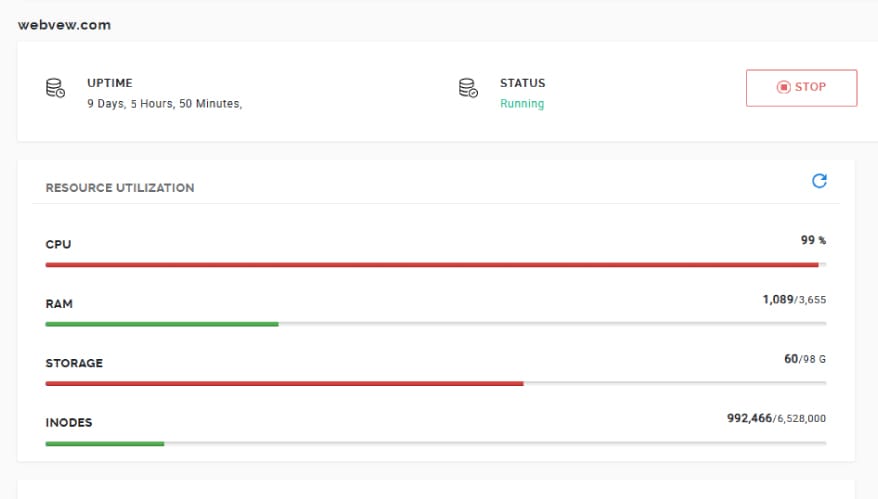
A client was experiencing frequent downtime and slow performance across multiple websites hosted on a VPS server. The server was running approximately 30 WordPress installations, and performance issues were affecting both uptime and user experience.
The objective was to identify the root cause of high CPU usage, stabilize the server, and optimize performance across all hosted sites.
The Problem
- VPS server frequently going down
- Websites loading very slowly
- High CPU usage reported by hosting provider
- Multiple WordPress sites competing for limited resources
Upon contacting hosting support, it was confirmed that CPU usage was consistently near maximum capacity.
Investigation Process
1. Resource Usage Analysis
- Reviewed server load via WHM and hosting metrics
- Checked AWStats in cPanel to analyze traffic sources
- Identified suspicious user agents consuming significant resources:
- Empty User-Agent requests
Go-http-client
These indicated bot or automated traffic contributing to server overload.
2. Server-Level Blocking (Apache Configuration)
To immediately reduce unwanted load, I implemented blocking rules at the Apache level using WHM.
Path:
WHM → Service Configuration → Apache Configuration → Include Editor → Pre VirtualHost Include (All Versions)
Implemented the following rules:
# Block empty User-Agent
<IfModule mod_rewrite.c>
RewriteEngine On
RewriteCond %{HTTP_USER_AGENT} ^$
RewriteRule .* - [F,L]
</IfModule>

# Block Go-http-client
<IfModule mod_rewrite.c>
RewriteEngine On
RewriteCond %{HTTP_USER_AGENT} Go-http-client [NC]
RewriteRule .* - [F,L]
</IfModule>

# Limit admin-ajax.php abuse
<Files "admin-ajax.php">
    <IfModule mod_rewrite.c>
        RewriteEngine On

        # Allow logged-in users
        RewriteCond %{HTTP_COOKIE} wordpress_logged_in_ [OR]

        # Allow Elementor Forms
        RewriteCond %{HTTP_REFERER} elementor [NC,OR]

        # Allow frontend AJAX actions
        RewriteCond %{QUERY_STRING} action= [NC]

        RewriteRule .* - [L]
    </IfModule>
</Files>
Result:
- Successfully blocked malicious and unnecessary requests
- No further activity from these user agents after implementation
- Significant reduction in CPU spikes
3. Process Monitoring
- Monitored Daily Process Log via WHM
- Identified high resource-consuming processes
- Verified improvements after applying server-level rules
4. PHP-FPM Optimization
Optimized PHP-FPM settings for better resource allocation:
- Max Children: 5 (per site)
- Max Requests: 500
This helped control concurrent processes and prevent resource exhaustion.
5. WordPress-Level Optimization
To further reduce server load:
- Installed and configured Heartbeat Controller plugin
- Increased interval for WordPress Heartbeat API
This reduced frequent background AJAX calls that were contributing to CPU usage.
6. Cleanup Strategy
- Planned removal of unused or unnecessary websites from the VPS
- Reduced overall load by minimizing active installations
Final Results
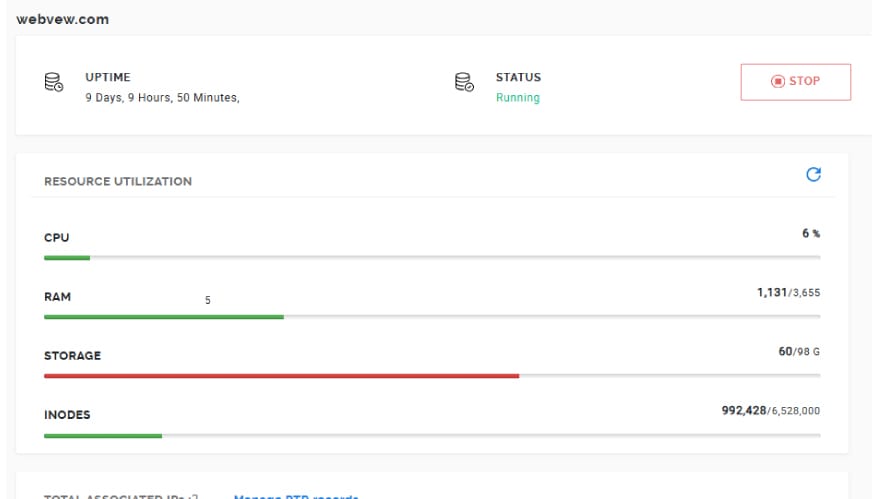
- Server stabilized with no frequent downtime
- Significant reduction in CPU usage
- Improved performance across all hosted websites
- Reduced unnecessary bot traffic and background processes
Key Improvements Achieved
- Blocked harmful and resource-heavy bot traffic
- Optimized server-level request handling
- Improved PHP process management
- Reduced WordPress background activity
- Enhanced overall server stability
Outcome
- ✅ Stable VPS environment
- ✅ Reduced CPU load
- ✅ Faster website response times
- ✅ Improved reliability across 30+ sites
Conclusion
This case highlights the importance of combining server-level controls with application-level optimization when managing multiple WordPress sites on a single VPS.
By identifying abnormal traffic patterns, implementing targeted blocking rules, and optimizing PHP and WordPress behavior, the server was successfully stabilized without requiring immediate hardware upgrades.